Helping preschool kids with reading
Little thingy that helps children read websites, before they can read everything:
- makes all text UPPERCASED
- one click → read aloud
- auto language (reads in the page’s language)
- highlights the currently read/hovered element (easier to spot the letters)
Quick demo
Open demo video directlyHow to set it up
Use Arc Browser.
1) Enable Arc debugging pages:
- Open
arc://chrome-urls/. - In
Internal Debugging Page URLs, clickEnable internal debugging pages. - Confirm that the section now says internal debugging pages are enabled.
2) Create the Boost:
- Open Khan Academy in Arc.
- In top right corner click on “settings” icon > then on three dots in bottom corner > New boost…
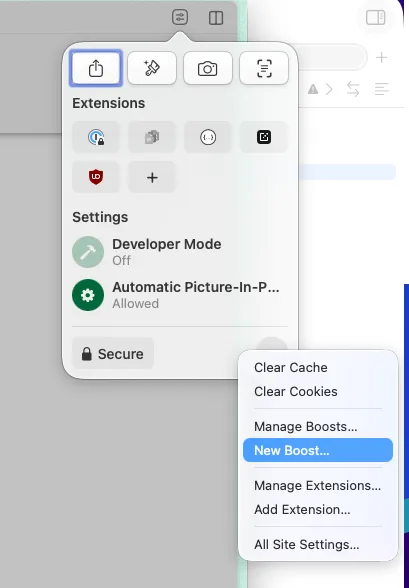
- It shows this window
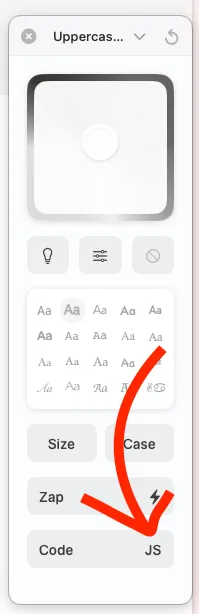
- Click on
Codeso you can edit CSS and JavaScript.
3) Paste the code
What it does:
- forces all text to UPPERCASE
- highlights text blocks on hover (red outline)
- detects readable elements (buttons, text, labels…)
- on click: extracts text and reads it aloud
- auto-detects correct language from page (lang, fallback to browser)
- uses built-in speech synthesis (no external API)
- initializes once and attaches global listeners (hover + click)
const HIGHLIGHT_CLASS = 'arc-hover-highlight';
const BOOST_STYLE_ID = 'arc-reading-boost-style';
const BOOST_READY_FLAG = 'arcReadingBoost';

function ensureStyles() {
  if (document.getElementById(BOOST_STYLE_ID)) return;
  if (!document.head) return;

  const style = document.createElement('style');
  style.id = BOOST_STYLE_ID;
  style.textContent = `
    * {
      text-transform: uppercase !important;
    }
    .${HIGHLIGHT_CLASS} {
      outline: 2px solid red;
      cursor: pointer;
    }
  `;
  document.head.appendChild(style);
}

function normalizeLangTag(lang) {
  if (!lang) return '';
  return lang.trim().replace('_', '-');
}

function detectPageLanguage(element) {
  const nearest = element?.closest?.('[lang]');
  const langFromElement = normalizeLangTag(nearest?.getAttribute('lang'));
  if (langFromElement) return langFromElement;

  const langFromHtml = normalizeLangTag(document.documentElement?.lang);
  if (langFromHtml) return langFromHtml;

  const langFromBody = normalizeLangTag(document.body?.lang);
  if (langFromBody) return langFromBody;

  return normalizeLangTag(navigator.language) || 'en-US';
}

function readTextWithLanguage(text, language) {
  if (!('speechSynthesis' in window)) return;
  const content = text.trim();
  if (!content) return;

  window.speechSynthesis.cancel();
  const utterance = new SpeechSynthesisUtterance(content);
  utterance.lang = normalizeLangTag(language) || 'en-US';
  window.speechSynthesis.speak(utterance);
}

function extractReadableText(element) {
  const ariaLabel = element.getAttribute('aria-label') || '';
  if (ariaLabel.trim()) return ariaLabel.trim();

  const text = (element.innerText || element.textContent || '').trim();
  return text;
}

function getReadableTarget(node) {
  if (!(node instanceof HTMLElement)) return null;
  const el = node.closest(
    'button, a, p, span, strong, h1, h2, h3, h4, h5, h6, li, label, legend, [role="button"]'
  );
  if (!(el instanceof HTMLElement)) return null;
  if (!extractReadableText(el)) return null;
  return el;
}

function handleMouseOver(event) {
  const target = getReadableTarget(event.target);
  if (!target) return;
  target.classList.add(HIGHLIGHT_CLASS);
}

function handleMouseOut(event) {
  const target = getReadableTarget(event.target);
  if (!target) return;
  target.classList.remove(HIGHLIGHT_CLASS);
}

function handleClick(event) {
  const target = getReadableTarget(event.target);
  if (!target) return;
  const text = extractReadableText(target);
  if (!text) return;
  const language = detectPageLanguage(target);
  readTextWithLanguage(text, language);
}

function init() {
  if (!document.body || document.body.dataset[BOOST_READY_FLAG] === 'ready') return;

  ensureStyles();
  document.body.addEventListener('mouseover', handleMouseOver);
  document.body.addEventListener('mouseout', handleMouseOut);
  document.body.addEventListener('click', handleClick);
  document.body.dataset[BOOST_READY_FLAG] = 'ready';
}

function bootstrap() {
  if (document.body) {
    init();
    return;
  }
  setTimeout(bootstrap, 100);
}

if (document.readyState === 'loading') {
  document.addEventListener('DOMContentLoaded', bootstrap, { once: true });
} else {
  bootstrap();
}
4) Test it
Press on “Click to Read” boost to enable it.
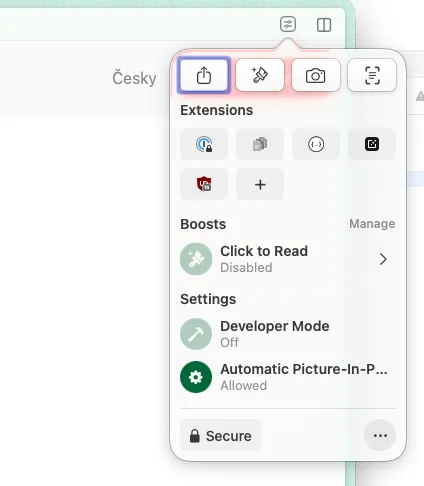
Now it is enabled.
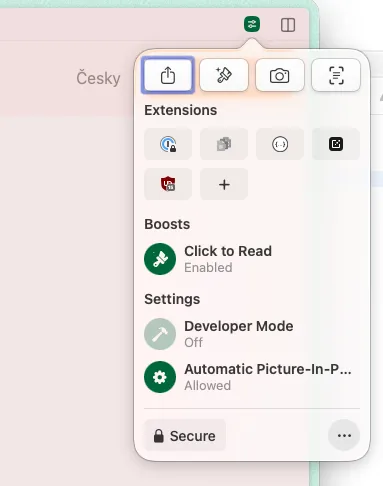
Reload page and try tap on some text to hear it.
Enjoy
Official Arc Boost guide with more screenshots and flow details: Boosts: Customize Any Website